

Introduction #
Search is often the primary way users find products on e-commerce platforms. A high-quality search system shouldn’t only be fast and resilient but also highly relevant.
1. Requirements #
Functional Requirements #
- Keyword Search: Full-text product search over titles, descriptions, categories, and attributes.
- Fuzzy Matching: Fuzzy matching for typos and approximate terms, particularly on short fields like product titles and brands.
- Personalization: User-based or segment-based results using behavioural data.
- Ranking: Results must be ordered by relevance to the user’s intent.
- Autocomplete/typeahead and search suggestions: As the user types, the system should provide relevant suggestions.
- Faceted Search: Users should be able to search and also filter results based on various attributes like category, colour, price, etc.
- Internationalization: Support for multiple languages and locales.
Non-Functional Requirements #
- Low Latency: Search results should appear in under 200ms for 100K queries per second.
- High Availability: The system should be available 99.9% of the time.
- Near Real-time Indexing: Product updates should be reflected in search results within seconds.
- Strong Observability: Observability is key in a search system, we should be able to track metrics like query latency, search relevance, click-through rate, etc.
2. High-Level Architecture #
For this discussion, we will be using Lucene as our search engine.
Core Concepts in Lucene #
Inverted Index and Documents #
Lucene represents data as documents composed of fields, which are tokenized into terms and stored in an inverted index mapping Terms -> Documents. This structure enables fast term lookup and relevance scoring without scanning all documents linearly.
A product document might include:
- Text fields:
title,description,category_path,brand. - Keyword fields:
product_id,seller_id,category_id,brand_id. - Numeric fields:
price,discount,inventory,rating,popularity_score. - Facet fields: hierarchical or categorical fields suitable for Lucene’s facet module.
Analyzers, tokenizers, and filters #
Lucene analyzers perform lexical analysis: lowercasing, tokenization, stopword removal, stemming, etc., producing tokens that are written into the index and used for query parsing. Different fields can use different analyzers; for example, titles might use a language-specific analyzer, while SKUs and IDs use a keyword analyzer.
FuzzyQuery and edit distance #
Lucene’s FuzzyQuery leverages Damerau–Levenshtein edit distance to match terms within a configurable maximum number of edits (typically up to 2) and rewrites internally into an optimized multi-term query over matching terms. Higher edit distances can explode the term expansion set and are usually not recommended for general search, where n‑gram or spelling-correction approaches are often preferable.
With the above in mind, let’s break down our components:
Logical components #
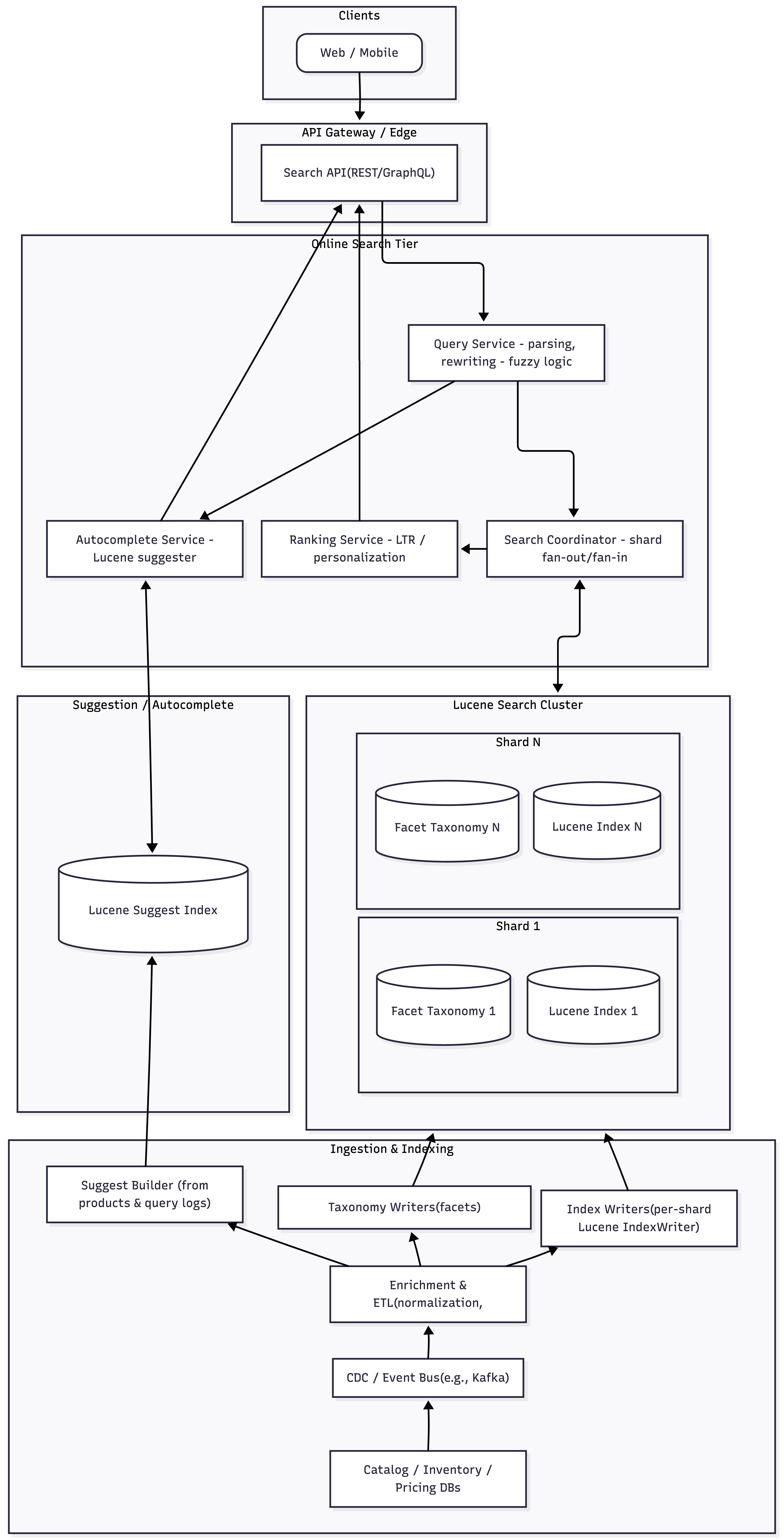
Indexing pipeline
- Source ingestion (catalog DB, CMS, inventory, pricing systems)
- Normalization and enrichment (category mapping, attribute extraction, language detection).
- Index builders (Lucene index writers for main index, suggestion index, facet taxonomies).
Online query layer
- API gateway / GraphQL or REST endpoint for clients.
- Query parser and search service using Lucene IndexSearcher.
- Ranking and re-ranking subsystem (combining Lucene scores with business and personalization signals).
- Autocomplete and suggestion service (Lucene suggesters, possibly separate indices).
- Facet computation service (Lucene facet module / taxonomy index).
Personalization services
- User profile store (interests, historic interactions, constraints like preferred price ranges).
- Real-time behavioral feature extraction (session-level events such as clicks and add-to-cart).
- ML ranking models and feature service for inference.
Physical deployment #
- Multi-node Lucene search cluster, sharded by product ID ranges or category, each shard replicated across AZs.
- Separate clusters or indices for:
- Core product search.
- Autocomplete/suggestion.
- Analytics or long-term storage (e.g., separate warehouse).
- API layer stateless; communicates with search cluster via RPC or a thin search gateway.
3. Data Modeling and Index Design #
Product document schema #
Key principles:
- Choose field types carefully (text vs keyword vs numeric vs facet) and optimize stored vs indexed vs doc values usage.
- Denormalize related information (brand, category path, basic seller info) into the document for performance.
Example schema:
- Identifiers:
product_id(keyword, stored, not analyzed),sku_id(optional, keyword). - Text fields:
title(text, language-specific analyzer, indexed, term vectors optional),description(text, same analyzer as title but with lower boost),brand_name(text with minimal normalization; can also have a keyword brand_id),category_path(tokenized on separators for matching queries such as “running shoes”). - Numeric / sortable fields:
price(numeric doc values, used for range queries and sorting),discount_percent,rating,review_count,popularity_score(numeric doc values). - Facet fields:
brand_facet,category_facet,colour_facet,size_facet,price_bucket_facetas facet fields integrated with Lucene’s facet module and a separate facet index. - Personalization hints:
segment_idsoraudience_tagsto support targeted boosting or filtering.
Index layout and sharding strategy #
- Horizontal sharding by product ID range, potentially with hot categories split more finely.
- Each shard is a separate Lucene index with N replicas; IndexSearcher instances per replica.
- Global routing either via a search gateway or within an application server layer.
- Pros of this approach include straightforward scaling and isolation of large segments of data; cons include increased complexity for aggregated operations (e.g., global sort by price), which are handled by coordinating shard-level top‑K results.
4. Indexing Pipeline #
Source ingestion and change data capture #
- Primary product data originates from product catalog and CMS systems.
- Change Data Capture (CDC) via Kafka - captures inserts, updates, and deletes.
- Auxiliary data (inventory counts, pricing updates, click and conversion stats) are ingested on separate topics and joined with product data in the indexing pipeline.
Maintaining autocomplete and suggestion indices #
Lucene’s suggest module provides specialized data structures (e.g., AnalyzingInfixSuggester) optimized for autocomplete without indexing all possible query combinations. The suggestion index is built from fields such as product titles and popular queries, and is updated periodically from the product index and query logs.
Facet taxonomy management #
Lucene’s facet module typically uses a taxonomy index to map hierarchical category paths to numerical identifiers instead of string labels, enabling efficient aggregation of facet counts over search results. The pipeline must:
- Maintain the taxonomy consistent with the product index, updating when categories or facets change.
- Ensure faceted fields in product documents reference the correct taxonomy ordinals.
Think of the taxonomy index as a master lookup table. It says:
0 -> ROOT1 -> Category/Electronics2 -> Category/Electronics/Phones3 -> Brand/Apple etc.
Each product document just stores a list of these numbers (e.g. 2, 3, …) instead of full strings. Your pipeline’s job is to:
- Keep this lookup table complete and up‑to‑date with all categories that exist.
- Make sure every product document uses the right numbers from that table for its facet fields.
If either of those breaks (taxonomy not updated, or wrong IDs stored in docs), facet counts will be wrong or missing.
5. Query Processing Flow #
API and request model #
The client sends a search request containing:
query: raw user query string.filters: list of filters (e.g., brand: Nike, price: [1000, 4000], in_stock: true).facets: requested facet dimensions and configurations (e.g., which facets to compute, maximum number of buckets).sort: primary and secondary sort keys; default is relevance.user_context: user ID, locale, device type, experiment IDs.pagination: page number, page size.
Query understanding and parsing #
Steps:
- Preprocess query: normalize whitespace, lowercasing, language detection, and optional spell correction.
- Tokenize: using the same analyzer as title/description fields where appropriate to ensure analysis symmetry between indexing and querying.
- Rewrite into Lucene Queries:
- Primary full-text query (e.g.,
MultiFieldQueryParserovertitle^3,brand_name^2,category_path^1.5,description). - Optional
FuzzyQueryclauses for misspellings on key fields like title or brand_name when term frequency is low or when short queries with high typo risk are detected. - Filter queries for facets and other constraints, usually implemented as
BooleanQuerywithFILTERclauses for structured fields.
- Primary full-text query (e.g.,
Coordination across shards #
- The search coordinator broadcasts the logical query to all relevant shards.
- Each shard returns top‑K results (document IDs, Lucene scores, selected stored fields, facet counts if computed shard-local).
- The search coordinator merges results:
- Combine and re-rank top‑K results globally based on Lucene scores and re-ranking logic.
- Aggregate facet counts by summing per-shard facet histograms.
How does pagination work with this sharded lucene cluster? #
Let’s consider the below example:
For page 1 (from=0, size=10):
- Search coordinator asks each shard for some K (e.g., 20) best hits.
- Each shard returns its
TopDocssorted by score (or by the requested Sort). - Search coordinator calls
TopDocs.merge(start=0, topN=10, shardHits)and gets the global top 10.
For page 2 (from=10, size=10):
- Coordinator again asks each shard for its top K (often
K >= from+sizeor a tuned value). - Each shard returns its top K starting from rank 0 — no local “skip 10”.
- Coordinator calls
TopDocs.merge(start=10, topN=10, shardHits)and gets the globally ranked[10..19]slice.
The “skip 10” happens once, centrally, on the globally merged list, not once per shard.
Nothing is missed, because:
- All shards’ candidates up to at least the depth you care about are available to the merge.
- The global merge computes a single sorted stream and only then drops the first
fromentries.
The cost is that each page recomputes top‑K per shard; that’s why deep pagination is expensive and often capped.
// Represents a logical search request coming from your API layer.
public class SearchRequest {
    private final String queryString;
    private final int from;
    private final int size;

    public SearchRequest(String queryString, int from, int size) {
        this.queryString = queryString;
        this.from = from;
        this.size = size;
    }

    public String getQueryString() { return queryString; }
    public int getFrom() { return from; }
    public int getSize() { return size; }
}
// A single hit in the API response (business-level, not Lucene-level).
public class SearchHit {
private final String productId;
private final float score;
public SearchHit(String productId, float score) {
this.productId = productId;
this.score = score;
}
public String getProductId() { return productId; }
public float getScore() { return score; }
}// Aggregated response back to the caller.
import org.apache.lucene.search.TotalHits;
import java.util.List;
public class SearchResponse {
private final TotalHits totalHits;
private final List<SearchHit> hits;
public SearchResponse(TotalHits totalHits, List<SearchHit> hits) {
this.totalHits = totalHits;
this.hits = hits;
}
public TotalHits getTotalHits() { return totalHits; }
public List<SearchHit> getHits() { return hits; }
}// Abstraction over a shard-local Lucene IndexSearcher.
import org.apache.lucene.search.Query;
import org.apache.lucene.search.TopDocs;
public interface ShardClient {
int getShardId();
// Returns topK hits (by score) for this shard.
TopDocs searchShard(Query query, int topK) throws Exception;
// Load business fields (e.g., product_id) for a given doc.
String loadProductId(int luceneDocId) throws Exception;
}import org.apache.lucene.analysis.standard.StandardAnalyzer;
import org.apache.lucene.queryparser.classic.QueryParser;
import org.apache.lucene.search.*;
import java.util.ArrayList;
import java.util.List;
import java.util.concurrent.*;
public class SearchCoordinator {
private final List<ShardClient> shardClients;
private final ExecutorService executor;
private final QueryParser queryParser;
public SearchCoordinator(List<ShardClient> shardClients) {
this.shardClients = shardClients;
this.executor = Executors.newFixedThreadPool(shardClients.size());
this.queryParser = new QueryParser("title", new StandardAnalyzer()); // field & analyzer as appropriate
}
public SearchResponse search(SearchRequest request) throws Exception {
Query query = queryParser.parse(request.getQueryString());
int numShards = shardClients.size();
int from = request.getFrom();
int size = request.getSize();
// Simple heuristic: ask each shard for enough docs to safely cover 'from + size'
int perShardTopK = computePerShardTopK(from, size, numShards);
// 1) Fan out in parallel
List<Future<TopDocs>> futures = new ArrayList<>(numShards);
for (ShardClient shard : shardClients) {
futures.add(executor.submit(() -> shard.searchShard(query, perShardTopK)));
}
// 2) Collect shard results and set shardIndex on ScoreDocs (required for TopDocs.merge)
TopDocs[] shardHits = new TopDocs[numShards];
TotalHits.Relation relation = TotalHits.Relation.EQUAL_TO;
long totalHitsValue = 0L;
for (int i = 0; i < numShards; i++) {
TopDocs td = futures.get(i).get(); // wait for shard i
int shardId = shardClients.get(i).getShardId();
for (ScoreDoc sd : td.scoreDocs) {
sd.shardIndex = shardId; // important for correct merge across shards[web:83]
}
shardHits[i] = td;
totalHitsValue += td.totalHits.value;
if (td.totalHits.relation == TotalHits.Relation.GREATER_THAN_OR_EQUAL_TO) {
relation = TotalHits.Relation.GREATER_THAN_OR_EQUAL_TO;
}
}
TotalHits totalHits = new TotalHits(totalHitsValue, relation);
// 3) Merge and paginate globally
// Lucene provides TopDocs.merge(start, topN, TopDocs[])[web:83]
TopDocs merged = TopDocs.merge(from, size, shardHits);
// 4) Materialize business hits by going back to shards and loading product IDs
List<SearchHit> hits = new ArrayList<>(merged.scoreDocs.length);
for (ScoreDoc sd : merged.scoreDocs) {
ShardClient shard = findShardById(sd.shardIndex);
String productId = shard.loadProductId(sd.doc);
hits.add(new SearchHit(productId, sd.score));
}
return new SearchResponse(totalHits, hits);
}
private ShardClient findShardById(int shardId) {
for (ShardClient shard : shardClients) {
if (shard.getShardId() == shardId) {
return shard;
}
}
throw new IllegalStateException("Unknown shardId: " + shardId);
}
private int computePerShardTopK(int from, int size, int numShards) {
// Very simple heuristic; in production you’d tune this and cap it.
int depth = from + size;
int base = Math.max(size, depth / numShards);
return Math.min(1000, base * 2); // example cap
}
}import org.apache.lucene.document.Document;
import org.apache.lucene.search.IndexSearcher;
import org.apache.lucene.search.Query;
import org.apache.lucene.search.TopDocs;
public class LuceneShardClient implements ShardClient {
private final int shardId;
private final IndexSearcher searcher;
public LuceneShardClient(int shardId, IndexSearcher searcher) {
this.shardId = shardId;
this.searcher = searcher;
}
@Override
public int getShardId() {
return shardId;
}
@Override
public TopDocs searchShard(Query query, int topK) throws Exception {
// Simple score-based topK; could use sort-based search instead
return searcher.search(query, topK);
}
@Override
public String loadProductId(int luceneDocId) throws Exception {
Document doc = searcher.doc(luceneDocId);
return doc.get("product_id"); // or however you store it
}
}Using the Search Gateway
List<ShardClient> shards = List.of(
    new LuceneShardClient(0, shard0Searcher),
    new LuceneShardClient(1, shard1Searcher),
    new LuceneShardClient(2, shard2Searcher)
);

SearchCoordinator coordinator = new SearchCoordinator(shards);

SearchRequest req = new SearchRequest("running shoes", 0, 10);
SearchResponse resp = coordinator.search(req);

for (SearchHit hit : resp.getHits()) {
    System.out.println(hit.getProductId() + " score=" + hit.getScore());
}
Personalization and learning to rank #
Personalization uses user/session specific features to adjust ranking:
- User features: historical preferences (brands, categories), price sensitivity, frequent size or color choices.
- Contextual features: device, locale, referrer, time of day.
- Query-level features: query intent classification (navigational vs exploratory), semantic query category.
A typical design uses a two-stage ranking pipeline:
- Stage 1: Lucene returns top N candidates (e.g., 100–1000) using the base relevance and lightweight boosts.
- Stage 2: A learning-to-rank (LTR) model (e.g., gradient boosted trees or neural ranker) re-scores these candidates using a feature vector built from:
- Textual relevance scores and term statistics.
- Product attributes and business signals.
- User and context features.
The stage-2 model is hosted in a separate service or library loaded in search nodes, with cached models and feature extraction optimized to stay under latency budgets.
Query-time controls and explainability #
- Provide internal tools to inspect ranking decisions, exposing Lucene’s explain output and LTR feature contributions for a given query and product.
- Allow controlled overrides (e.g., “pin this product to the top for query X”) via a merchandiser-configured rules engine.
7. Fuzzy Search Design #
When to apply fuzzy search #
Fuzzy search handles typos and approximate spellings but must be constrained to avoid noise and performance issues, especially as Lucene restricts FuzzyQuery to at most two edits for performance reasons. The system applies fuzzy logic when:
- The query is short (1–3 tokens) and likely to contain typos.
- Exact term matching yields few or no results.
- The query tokens have low document frequency, signaling rarity and possible misspelling.
Implementation options #
- Direct
FuzzyQueryon fields such astitleorbrand_namewith tunedmaxEditsandprefixLength. - Spell-check index: a dedicated Lucene index or suggest-based dictionary with correctly spelled terms; query terms are corrected before or in parallel with search, and corrected queries are used to retrieve results.
- N‑gram fields: index additional n‑gram fields (e.g., 2–3 character shingled tokens) and use them for recall expansion at the cost of larger index size.
The chosen approach often combines lightweight spell correction for very short queries with limited fuzzy expansion for specific fields.
8. Autocomplete and Suggestions #
Autocomplete requirements #
Autocomplete must respond with suggestions within tens of milliseconds and can be implemented via Lucene suggesters, which maintain optimized data structures in memory to resolve partial queries without enumerating all word combinations.
Suggestion index design #
Build a suggestion index using AnalyzingInfixSuggester or similar:
- Keys: product titles, brand names, categories, and popular queries.
- Weight: popularity metrics such as past query frequency or product sales.
- Payload: serialized product or metadata (e.g., product IDs, image URLs) to display rich suggestions.
Use analyzers consistent with main index for language handling; infix suggester enables matching within multi-word terms.
Request handling #
As the user types, the client sends the current prefix; the autocomplete service queries the suggester for top‑K completions.
You can also implement debouncing at client side to prevent too many queries from being sent to the autocomplete service. Wrap the “call autocomplete API” function in a debounce, e.g. wait 150–300 ms after the last keypress before firing; intermediate keystrokes reset the timer. This alone can cut requests by ~80–90% while still feeling instant to users if you keep the delay under ~250 ms of perceived latency. Alternatively or additionally, use throttling (“at most one request every X ms”) for long typing sessions.
Further, do not hit the backend until the user has typed at least N characters (commonly 2–3). Ignore non‑semantic keys (arrows, tab, shift, ctrl, etc.) and avoid firing requests on every backspace or repeated same value.
Suggestions may be:
- Query suggestions (likely full queries that lead to good results).
- Direct product suggestions (individual products or brands) for fast navigation.
The service may filter suggestions using context (user locale, category context, prior interactions) and maintain separate suggesters per locale or per major category.